
MB HydroCalc2.0.0.2 - Get APK
You'll be able to download in few seconds.
Publisher Description
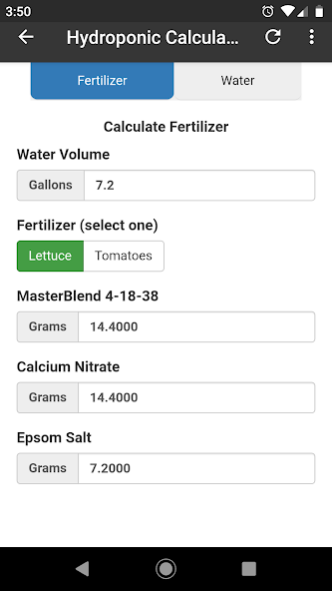
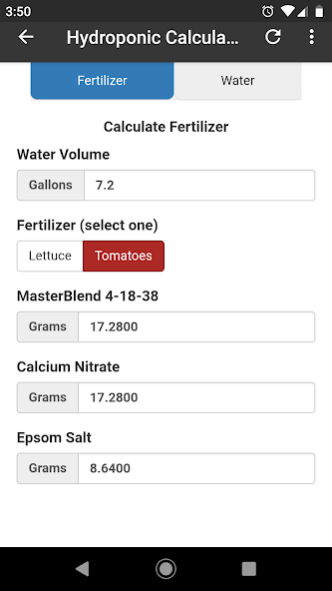
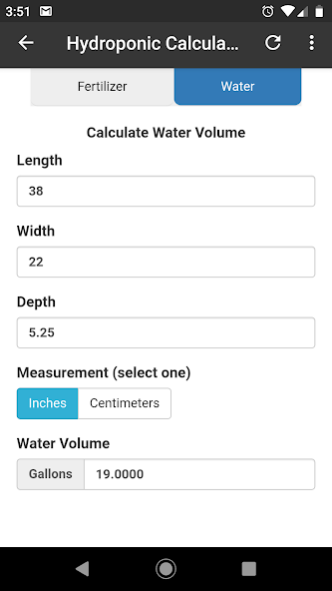
This calculator was designed to calculate how much nutrient-solution (fertilizer water) you will need to mix up to grow vegetables using MasterBlend's 4-18-38 tomato formula. This fertilizer can be used to grow vegetables with the "Kratky Method", using Dutch Buckets, or many other hydroponic methods.
To use the hydroponic fertilizer calculator you need to know either the dimensions of your container or the number of gallons it holds. We determine the correct amount of nutrients needed based on the total gallons amount.
Within the App, you can change from calculating Nutrients to calculating Water Volume by switching between the tabs at the top of the screen.
If you made a custom rectangular grow bed, you can input the inside dimensions into the Water Volume Calculator to find out how many gallons it holds. The number will carry over to the Fertilizer Calculator. Just remember that when using the Kratky Method, only 1/8-inch (or so) of your net pot should be underwater at the start of your grow.
If you already know how many gallons your containers hold, you can simply enter that number into the Water Volume field of the Fertilizer Calculator. The correct ingredient amounts will be calculated for you in Grams once you select either Lettuce or Tomatoes. It is important to weigh out the fertilizer using a scale so you don't over fertilize and kill your plants. Ideally, you would want the pH levels of your final solution to be around 6.4 - 6.7. You can research what your plants like best and check your solution using a pH meter.
While the calculator lists only a Tomato and Lettuce formula, the same two formulas have been successfully used with other vegetables as well. You can easily grow various types of peppers with the Tomatoes formula, and other leafy greens like kale work great with the lettuce formula.
About MB HydroCalc
The company that develops MB HydroCalc is KeystoneNews.net. The latest version released by its developer is 2.0.0.2.
To install MB HydroCalc on your Android device, just click the green Continue To App button above to start the installation process. The app is listed on our website since 2019-07-03 and was downloaded 0 times. We have already checked if the download link is safe, however for your own protection we recommend that you scan the downloaded app with your antivirus. Your antivirus may detect the MB HydroCalc as malware as malware if the download link to com.andromo.dev858070.app975406 is broken.
How to install MB HydroCalc on your Android device:
- Click on the Continue To App button on our website. This will redirect you to Google Play.
- Once the MB HydroCalc is shown in the Google Play listing of your Android device, you can start its download and installation. Tap on the Install button located below the search bar and to the right of the app icon.
- A pop-up window with the permissions required by MB HydroCalc will be shown. Click on Accept to continue the process.
- MB HydroCalc will be downloaded onto your device, displaying a progress. Once the download completes, the installation will start and you'll get a notification after the installation is finished.
Program Details
System requirements
Download information
Pricing
Version History
version 2.0.0.2
posted on 2019-07-03
Updated to latest API
version 1.0
posted on 2019-06-07
Version 1
Disclaimer
External Download
We do not host MB HydroCalc on our servers. We did not scan it for viruses, adware, spyware or other type of malware. This app is hosted by Galad and passed their terms and conditions to be listed there. We recommend caution when installing it.
The APK Download link for MB HydroCalc is provided to you by apps112.com without any warranties, representations or guarantees of any kind, so access it at your own risk.
If you have questions regarding this particular app contact the publisher directly. For questions about the functionalities of apps112.com contact us.
